The Moment It Clicked
A few days ago my wife mentioned that her team is planning to build agents that work alongside Claude for some of their use cases. I nodded like I understood, but later that evening I realized I couldn’t clearly explain what an “agent” actually is – or how it’s different from just using an LLM directly. I’d been hearing these terms everywhere – agents, MCP, tool calling – and using them somewhat interchangeably without really understanding the boundaries. What is the actual difference between an LLM vs Agent vs MCP?
So I went down the rabbit hole. I started reading the MCP spec, watching talks, going through documentation – and quickly noticed a pattern. Most articles and videos either assume you already know the concepts, or they’re written for developers whose use cases revolve around code generation and chat interfaces. However, if you’re an infrastructure engineer – someone who thinks in terms of clusters, APIs, networking, and observability – the examples don’t land. I found relatively few explanations written from an infrastructure perspective.
This post is my attempt to fix that. It’s the explanation I wish someone had given me when I started – written for people who understand systems but haven’t had time to dig into the AI tooling ecosystem.
We’re going to trace a real scenario – diagnosing why a Kubernetes pod keeps crashing – through every layer. By the end, you’ll know exactly what each piece does and where one stops and the next begins.
Note: I’m using a Kubernetes example because that’s my domain. But this architecture applies to any system. A data engineer could use an agent with a Snowflake MCP server to diagnose slow queries. A developer could use a GitHub MCP server to investigate CI failures. A DBA could use a PostgreSQL MCP server to find missing indexes. The layers and the flow are the same – only the MCP server and the external system it connects to changes.
The Scenario: LLM vs Agent vs MCP in Action
You’ve got a Kubernetes pod (a running container) that keeps restarting. You ask an AI system: “Why is my nginx pod restarting?”
Simple question. But the answer involves four distinct layers working together. Let’s break them apart.
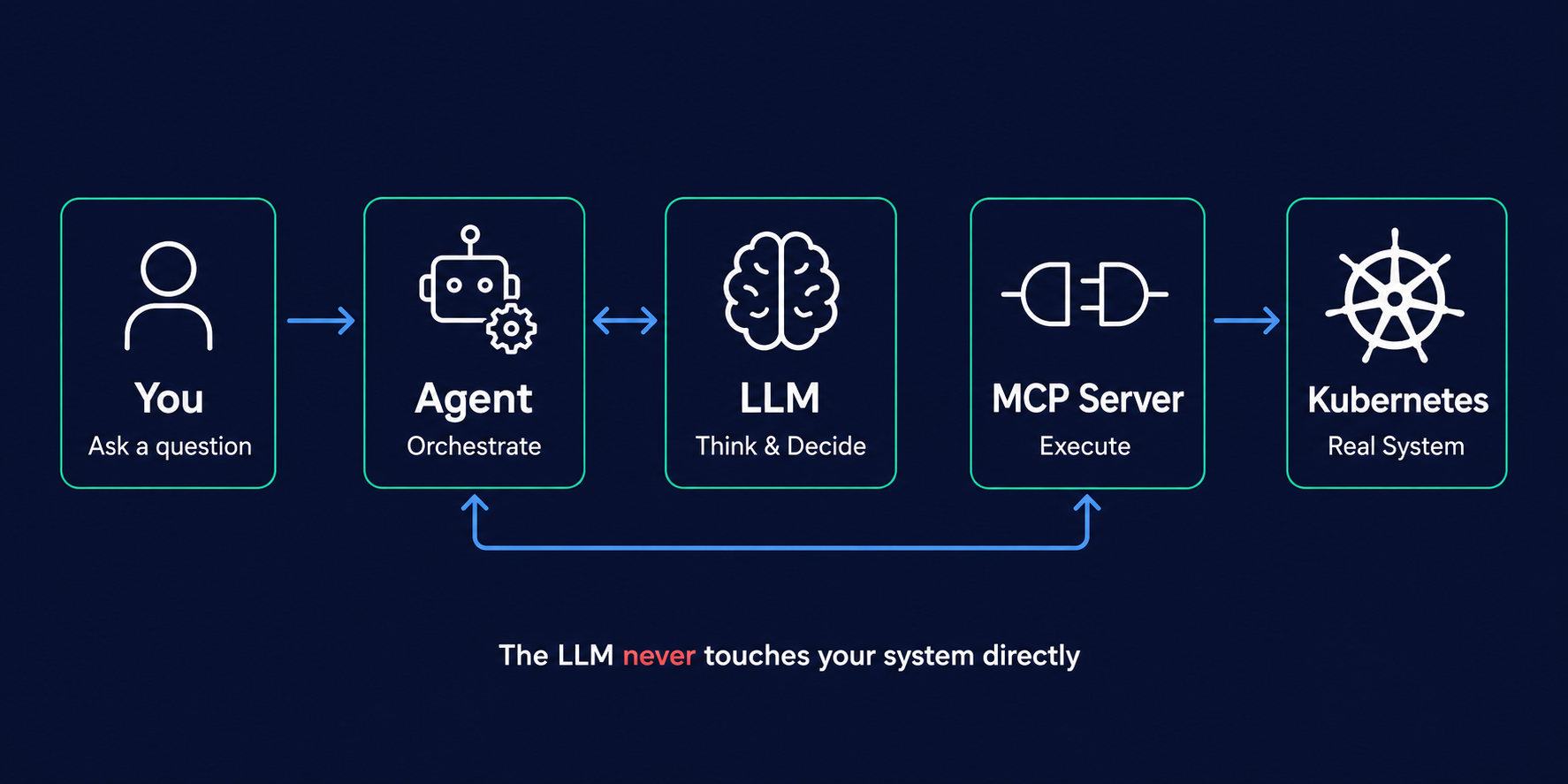
The four layers involved when an AI agent troubleshoots your system
Layer 1: The LLM – A Brain Without Hands
An LLM (Large Language Model) is a program trained on massive amounts of text. At its core, it processes sequences of tokens (roughly, words or pieces of words) and predicts what comes next. As a result, everything else – conversations, code generation, the appearance of “reasoning” – emerges from this basic mechanism scaled up to billions of parameters.
When you ask it about a crashing pod, it can tell you the common causes – out of memory, health check failures, wrong commands. After all, it has seen thousands of troubleshooting threads and documentation during training.
But here’s the thing: by itself, the model cannot inspect what’s happening in your system right now.
On its own, an LLM:
- Cannot run commands against your cluster
- Cannot inspect your configuration or files
- Cannot call your APIs or check live state
Those capabilities are provided by the surrounding application and tools. In short, the model is a reasoning engine – it can think about your problems and decide what actions should be taken – but it relies on an application layer to actually carry them out. This gap between “reasoning about problems” and “doing things” is the entire reason agents exist.
What an LLM gives you
You: "Why is my nginx pod restarting?"

LLM: "Common reasons include: out-of-memory kills, application errors,
      misconfigured health checks, missing configuration files, or
      image pull failures. Check pod events and container logs
      for specifics."
Generic. Correct, but generic. Like asking a doctor over the phone without letting them see the patient.
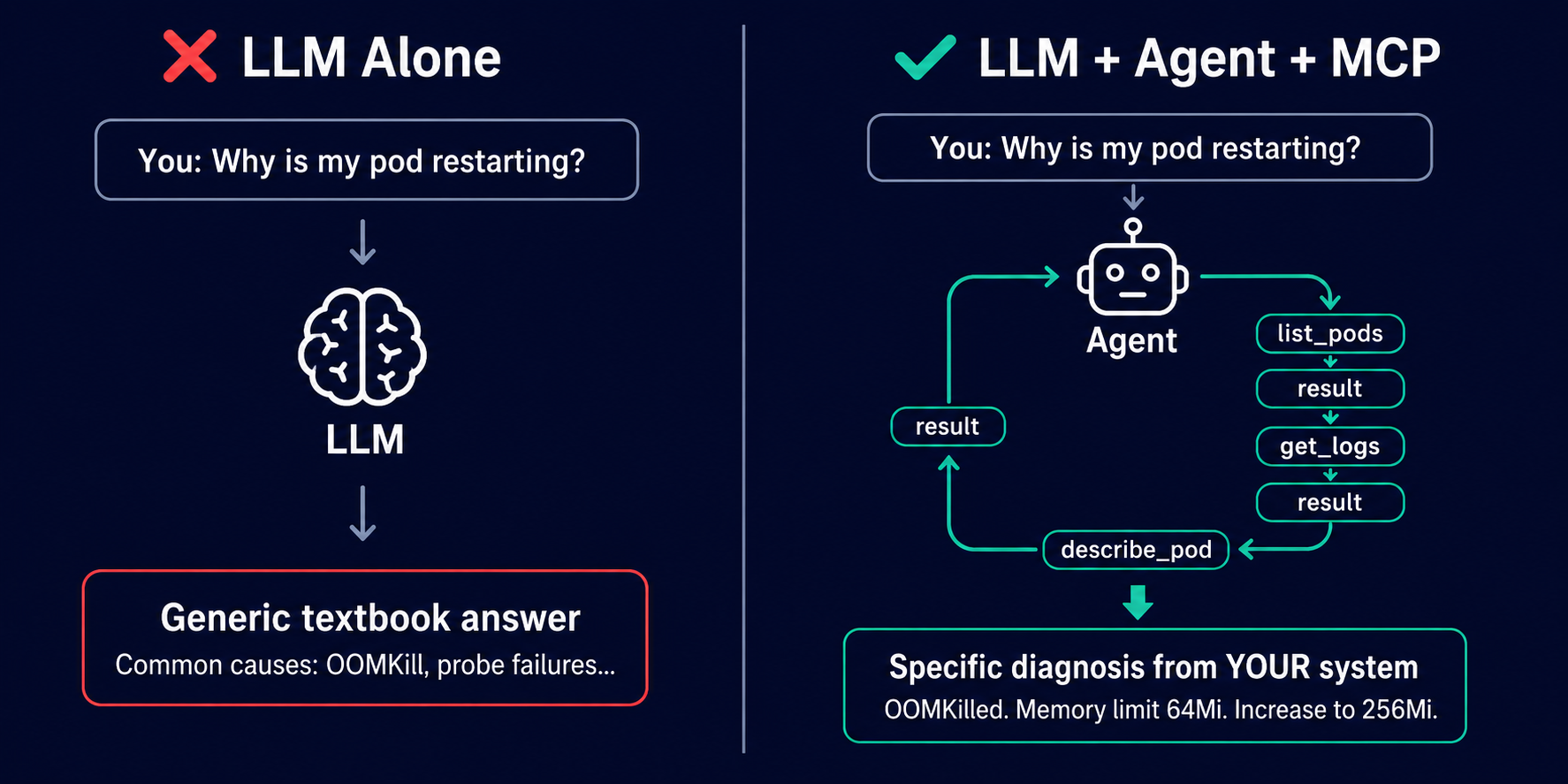
LLM alone vs LLM with Agent + MCP – the difference between a generic answer and a real diagnosis
Layer 2: The Agent – The Orchestration Loop
An agent is not another AI model. It’s not something you train. Instead, an agent is a software application built around an LLM that gives it the ability to observe, act, and iterate. You can install agent frameworks and applications (like LangChain, CrewAI, or Claude Desktop), but an agent is not the same thing as the foundation model inside it.
Think of it this way: the LLM is the brain. The agent is the whole person – brain plus body plus the decision to get up, walk across the room, and actually look at the patient’s chart.
An agent typically has:
- A system prompt – instructions that define its role and rules (example: “You are a Kubernetes troubleshooting assistant. Never delete resources without confirmation.”)
- Access to tools – functions it can call (like list_pods, get_logs, describe_deployment)
- An execution loop – the ability to reason, act, observe the result, then reason again
- Memory – context from the conversation so far
- Guardrails – boundaries on what it can and cannot do
Not every agent has all of these. For example, memory, guardrails, and planning are common features but not mandatory in every implementation. What makes an agent fundamentally different from a chatbot is the execution loop. A chatbot responds once. In contrast, an agent performs multiple steps – investigating until it reaches a conclusion, hits a boundary, or needs your input.
Agents can gather and summarise information faster than you could manually, but they’re not perfect. They can still miss context, choose the wrong tool, or reach an incorrect conclusion. Therefore, think of them as fast but junior – they investigate and gather data, you make the final decisions.
The loop in action
| Step | Phase | What happens |
|---|---|---|
| 1 | REASON | “User wants to know why nginx is restarting. I should check the pod status first.” |
| 2 | ACT | Calls list_pods(namespace="default") |
| 3 | OBSERVE | Sees nginx-7d4b8c6f-x9k2p, status=CrashLoopBackOff, restarts=12 |
| 4 | REASON | “Pod is crash-looping. CrashLoopBackOff means Kubernetes is delaying restarts – I need to find the actual termination reason. Let me check the container state details.” |
| 5 | ACT | Calls describe_pod(pod="nginx-7d4b8c6f-x9k2p") |
| 6 | OBSERVE | Sees container last state: terminated, reason=OOMKilled, exit code 137, memory limit 64Mi |
| 7 | REASON | “The container was OOM-killed – it exceeded its 64Mi memory limit. I should check if there are metrics or previous logs that show what the application was doing before termination.” |
| 8 | ACT | Calls get_logs(pod="nginx-7d4b8c6f-x9k2p", previous=true) |
| 9 | OBSERVE | Previous logs show nginx was handling traffic normally before being terminated – no application error |
| 10 | REASON | “The container is being killed for exceeding its memory limit under normal operation. I have enough information to report the cause and recommend next steps.” |
| 11 | DONE | Returns specific diagnosis with recommended investigation steps. |
Notice the pattern: reason, act, observe, repeat. The LLM decides what to do. The tools do it. Then the LLM reads the result and decides what’s next. This is not a single step – it’s a multi-step investigation, just like how you would troubleshoot it yourself.
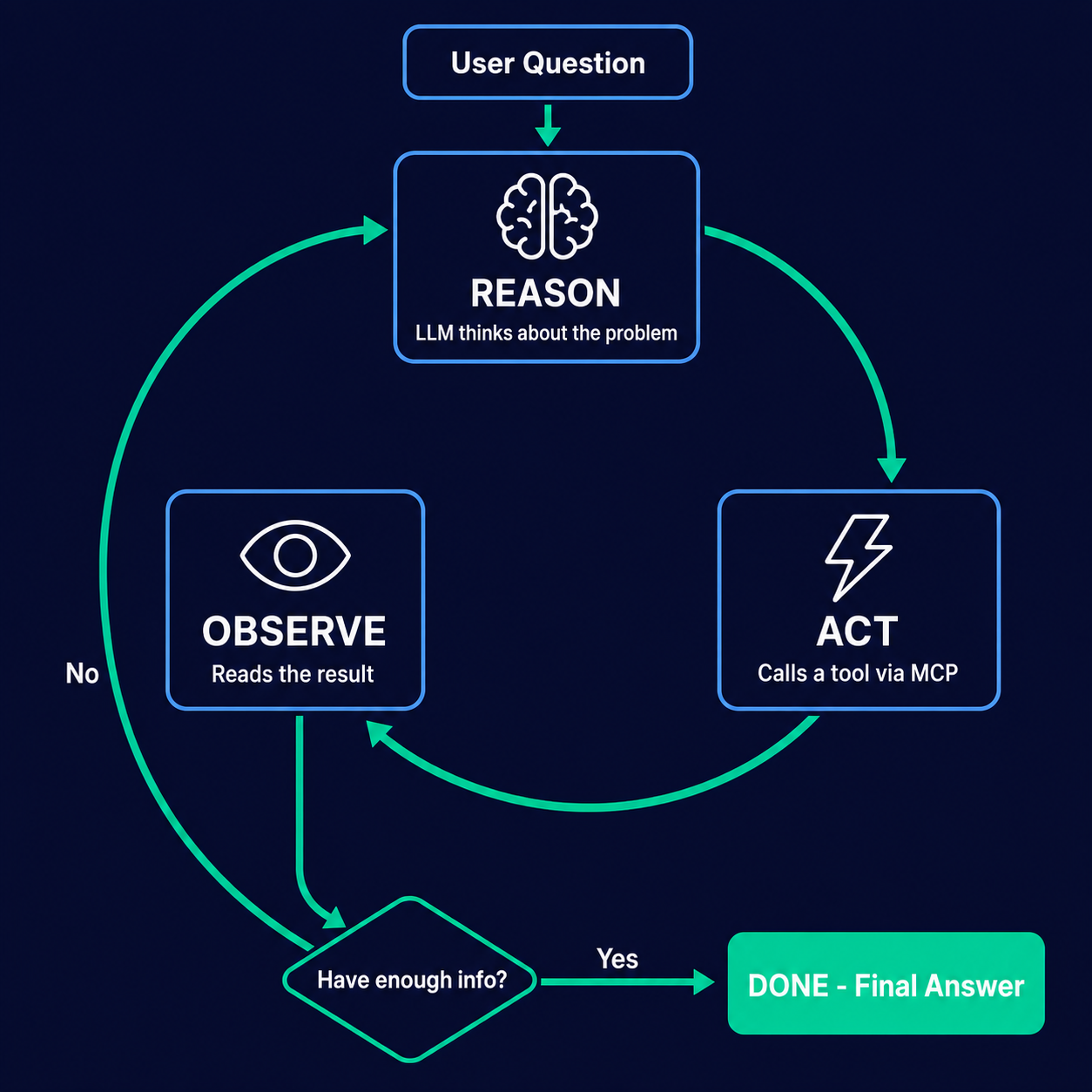
The core execution loop – reason, act, observe, repeat until done
Layer 3: Tool Calling – How the LLM Communicates What It Wants to Do
Tools are just functions. Regular code. No AI involved. Specifically, a tool has a name, a description, input parameters, and returns a result.
# This is a tool. It's just a function.
# Simplified for illustration - production code needs error handling and input validation.
def list_pods(namespace: str) -> str:
    """List all pods in a namespace with their status."""
    result = subprocess.run(
        ["kubectl", "get", "pods", "-n", namespace, "-o", "json"],
        capture_output=True,
        text=True,
        check=True
    )
    return result.stdout
When the agent starts up, it gives the LLM a menu of available tools – their names and descriptions. Then, the LLM reads these descriptions and picks which one to call based on the current situation. It’s like giving someone a list of abilities and letting them choose which one is relevant right now.
Here’s what that looks like under the hood. Instead of outputting regular text, the LLM outputs a structured tool call:
// Simplified illustration - the exact format is provider- and framework-dependent.
// The model generates a structured request; the host interprets and routes it.
{
  "tool": "list_pods",
  "arguments": { "namespace": "default" }
}
The agent host intercepts this, validates it, and routes it to the appropriate tool for execution. The result is fed back to the model for the next reasoning step.
The separation is clean:
- LLM decides what to do (reasoning)
- Tool does it (action)
- LLM reads the result (observation)
Layer 4: MCP – The Standard Protocol
Here’s where it gets interesting, because you’ve probably seen this pattern before in other areas of infrastructure.
First, an important clarification: agents can use tools without MCP. Native function calling, APIs, plugins, and framework-specific integrations all work. In other words, MCP is not required for an agent to interact with external systems.
So what problem does MCP solve? Imagine you’re building AI agents and you want them to talk to Kubernetes, GitHub, Prometheus, Slack, and Jira. Without a standard, every agent framework invents its own way to connect to tools. As a result, every tool provider writes a different integration for every agent framework. N frameworks times M tools equals N times M integrations. A mess.
At a high level, this is similar to how CSI (Container Storage Interface) solved the same problem in the container ecosystem. Before CSI, every storage vendor wrote custom code for every orchestrator. After CSI, they write one driver that works with any CSI-compatible orchestrator. The standards solve different problems, and actual compatibility still depends on the host, server capabilities, and implementation – but the concept is the same: a common interface that reduces bespoke integration work.
How MCP is structured
MCP (Model Context Protocol) is an open standard for connecting AI applications to tools, resources, and external systems. Essentially, it standardises how an AI application can discover and use capabilities exposed by external servers. MCP is not AI, not an LLM, and not an agent framework. It’s a standardised adapter layer.
In MCP’s architecture, there are three key components:
- MCP Host – the AI application (like an IDE, chat interface, or agent framework) that creates and manages client connections
- MCP Client – embedded in the host, maintains a connection to an MCP server
- MCP Server – a program that exposes tools, resources, and prompts via the MCP protocol, and internally calls the target system’s API
Importantly, the model does not communicate directly with the MCP server. Instead, the host application sits in between – receiving tool-call requests from the model and routing them through its MCP client to the appropriate server.
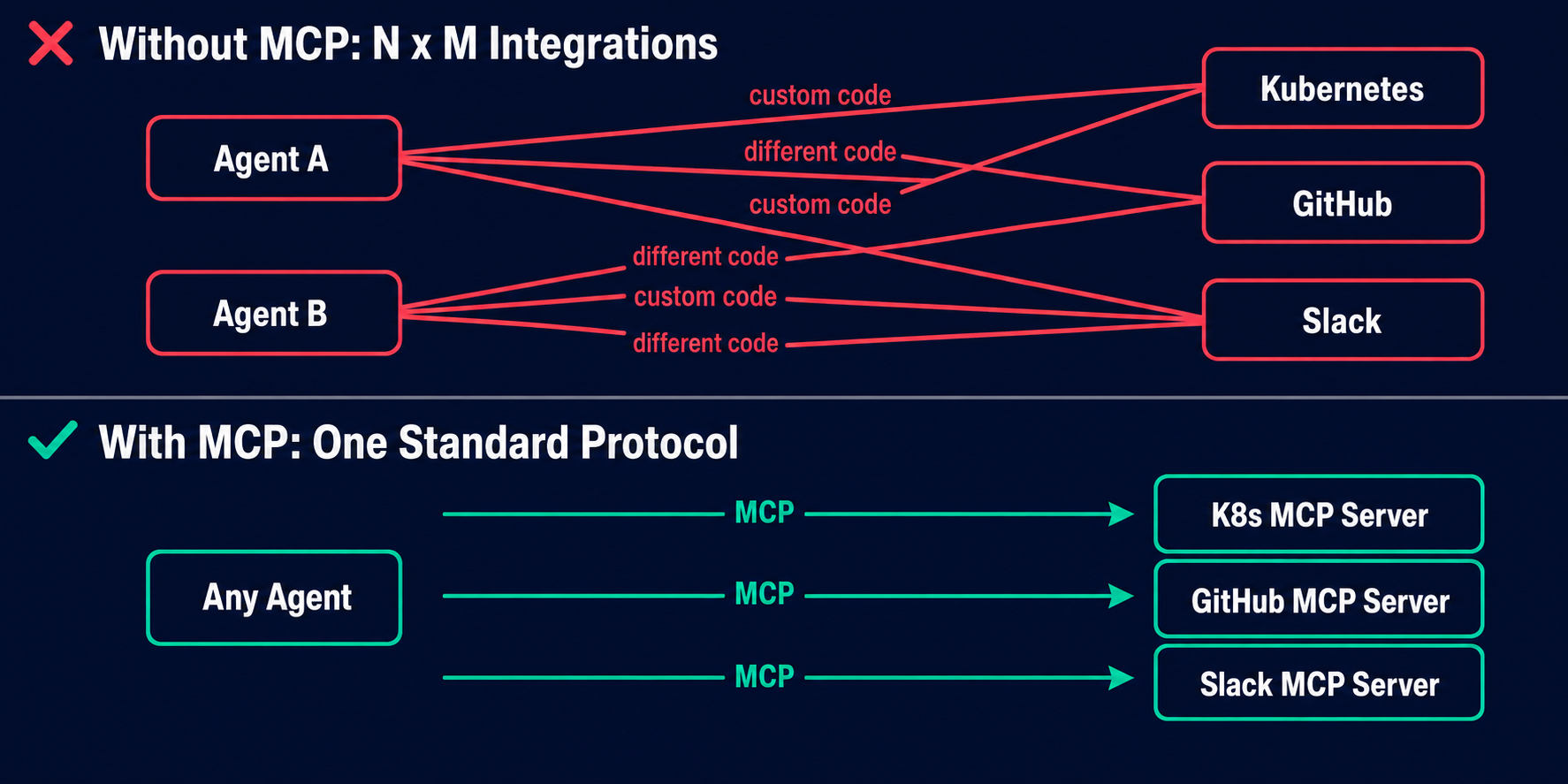
Without MCP: N x M custom integrations. With MCP: one standard protocol reduces integration work.
// This is an MCP message. It's JSON-RPC. No AI here.
// Simplified illustration - actual format varies by implementation.
{
  "jsonrpc": "2.0",
  "id": 1,
  "method": "tools/call",
  "params": {
    "name": "list_pods",
    "arguments": { "namespace": "default" }
  }
}
An MCP server is a regular program – written in Python, Go, TypeScript, whatever – that exposes tools via the MCP protocol and internally calls the target system’s API. For instance, the Kubernetes MCP server receives a list_pods call over MCP and translates it into a real Kubernetes API call (either directly via client libraries or through kubectl, depending on the implementation).
The MCP server is not AI. It doesn’t think, reason, or learn. It’s an adapter. It receives structured requests from the host’s MCP client and executes them against a real system.
The Full Picture: LLM vs Agent vs MCP Working Together
Now let’s put it all together. Here’s what actually happens when you ask “Why is my nginx pod restarting?” through an agent with a Kubernetes MCP server:
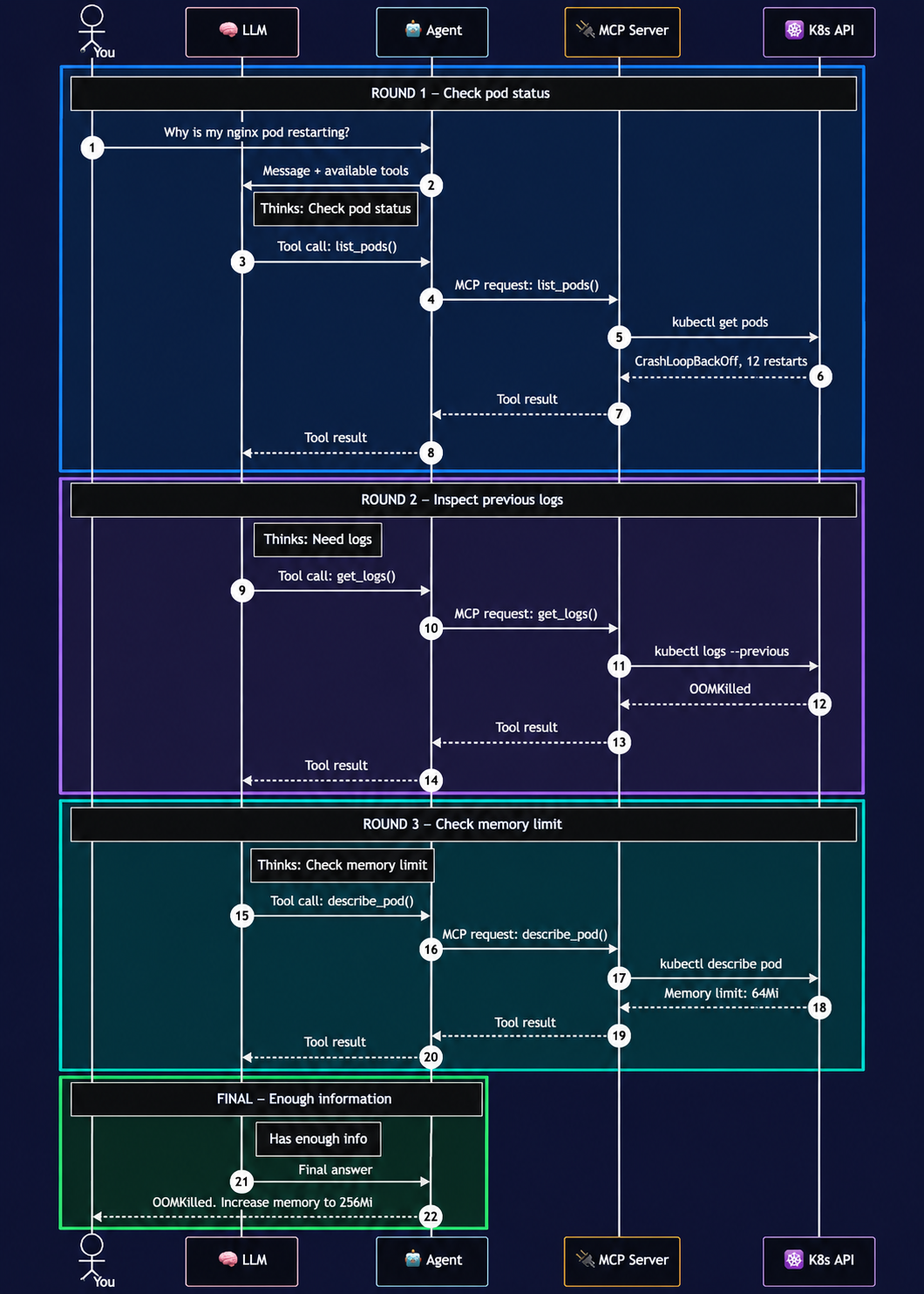
The complete troubleshooting flow – every message, every layer, every decision.
The diagram above shows the complete back-and-forth. Specifically, the agent host sits in the middle, orchestrating the interaction – sending context and tool definitions to the model, receiving tool-call requests back, validating them, and routing them through the MCP client to the appropriate MCP server for execution. In this flow, the model decides what action to take; the host decides whether and how to execute it.
A few rounds of reason, act, observe – and the agent returns a specific, evidence-based diagnosis:
"Your nginx pod nginx-7d4b8c6f-x9k2p is restarting because
the container is being OOM-killed - it exceeded its configured
memory limit of 64Mi. Exit code 137 confirms the process received
SIGKILL, which is consistent with Kubernetes memory-limit enforcement.

The previous container logs show normal operation before termination,
suggesting the workload simply needs more memory than 64Mi allows.

Recommended next steps:
1. Check actual memory consumption using metrics-server or
   container_memory_working_set_bytes from your monitoring stack.
2. Review the workload's expected memory requirements.
3. Set an appropriate memory limit based on observed peak usage
   plus a reasonable buffer.

Example (adjust values based on your measurements):
  resources:
    requests:
      memory: 128Mi
    limits:
      memory: 256Mi"
That’s not a generic answer from training data. That’s an evidence-based diagnosis from investigating your system.
Why the Separation Between LLM, Agent, and MCP Matters
Each layer has exactly one job. The diagram below shows what each layer does and – just as importantly – what it does NOT do:
This clean separation gives you several practical benefits:
- Swap the LLM without rebuilding your tool integrations. A compatible agent host can let you move between models (GPT-4, Llama 3, Claude) while MCP servers remain unchanged – though tool-calling behaviour can differ between models, so some prompt or configuration tuning may be needed.
- Add new MCP servers without custom integration for every AI application. Want Kubernetes access from a different tool? If it supports MCP, it can use the same server. You’ll still need to configure authentication and permissions for each new server.
- Update the integration without touching the AI. New version of the target system? Update the MCP server only.
- Layered security. Security in an agentic system spans multiple layers: agent host permissions, human approval controls, MCP client/server configuration, credential management, tool-level permissions, network policies, and Kubernetes RBAC. Credentials can remain with the MCP server or underlying service so they don’t need to appear in the model prompt – but the overall security posture depends on how each layer is implemented and configured. MCP doesn’t automatically make an integration secure.
If you’ve worked with modular systems or interface-driven design, this should feel familiar. Each component has a clear contract and a single responsibility.
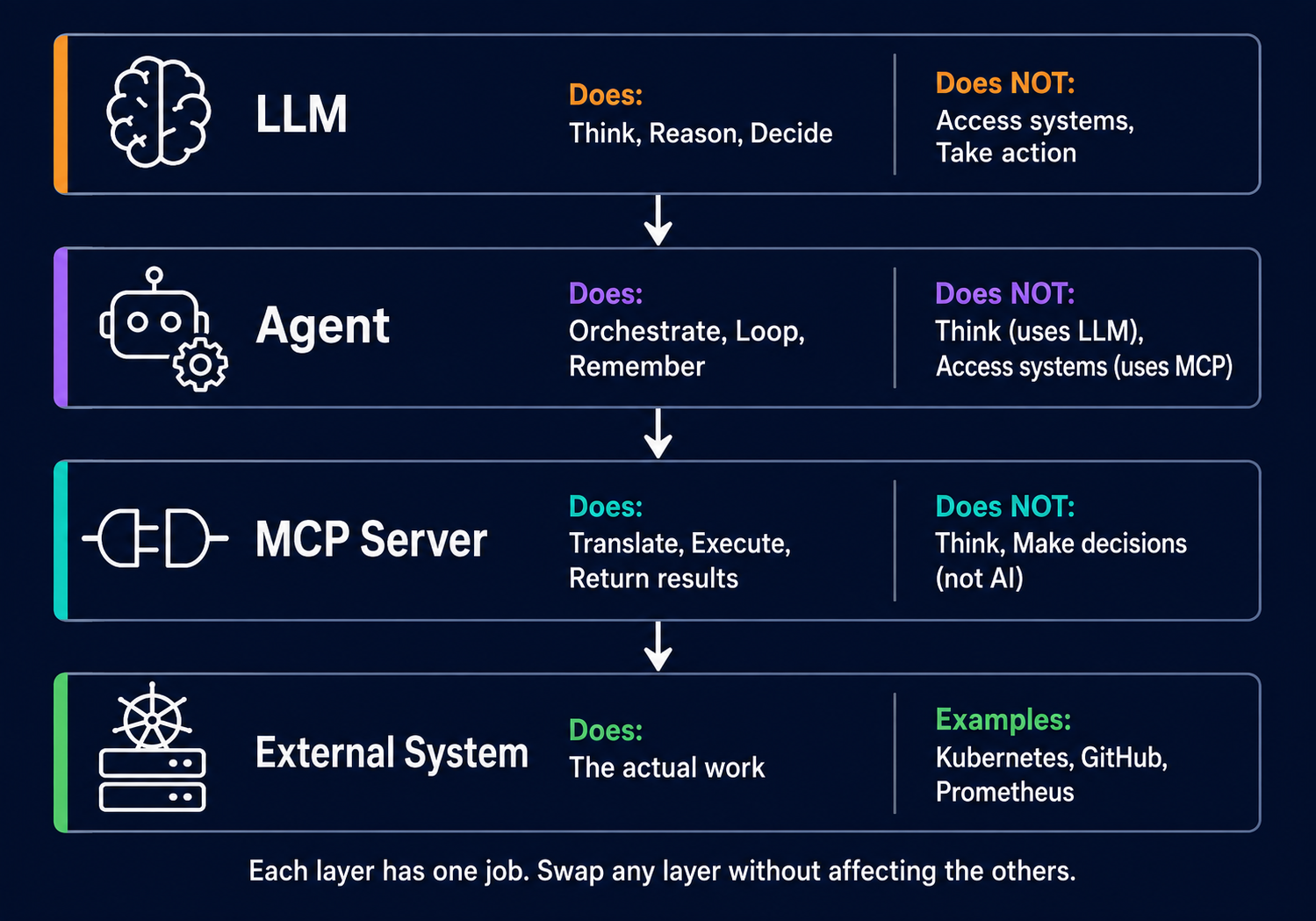
Each layer has one job and clear boundaries – swap any layer without affecting the others
Common Misconceptions About LLM vs Agent vs MCP
After spending time in this space, I keep seeing the same confusions. Addressing them directly:
| What people say | What’s actually true |
|---|---|
| “I installed an agent” | You probably installed an LLM. An agent is a system built around an LLM – not the LLM itself. |
| “MCP is AI” | MCP is an open communication protocol. It has zero intelligence. Saying “MCP is AI” is like saying “HTTP is AI.” Agents can also use tools without MCP – it’s a standardisation layer, not a requirement. |
| “The agent called the Kubernetes API” | The model decided to use a tool, the agent host validated and routed the request through its MCP client to the MCP server, which called the Kubernetes API. Multiple layers of orchestration in between. |
| “You need GPT-4 to build an agent” | Local models like Llama 3 and Qwen can handle basic tool-calling workflows. You can run a troubleshooting flow locally, though reliability with multi-step reasoning depends on the model, quantisation, context length, and complexity of the problem. |
| “Agents replace engineers” | Agents are like fast junior engineers – they can gather and process data quickly, but they can still miss context or reach wrong conclusions. They investigate and gather data. You make decisions. |
Where This Is Going
As infrastructure engineers, we’re going to see more of this. For example, MCP servers are being written for everything – cloud providers, monitoring stacks, CI/CD pipelines, databases. Meanwhile, the agents are getting better at multi-step reasoning, and the models are getting smaller and faster.
Consequently, this separation between reasoning (model), orchestration (agent host), and execution (MCP server) provides a useful mental model even as the implementations continue to evolve. Understanding these layers now gives you a stable framework for evaluating the ecosystem as it develops around you.
I’m currently setting up this exact stack in my lab – a local LLM with Ollama, an agent framework, and a Kubernetes MCP server – to see how this plays out in practice. The plan is to deliberately break pods and watch the agent diagnose them in real time. No cloud APIs, no costs, everything running locally. Once I have it working, I’ll share my observations, the gotchas, and real terminal output in the next post. Subscribe if you want to follow along.
If you’re interested in more Kubernetes internals, check out my post on how Kubernetes image cleanup actually works – another topic where the common understanding is wrong.
References
- Model Context Protocol – Official Specification
- MCP Architecture – Official Specification
- Anthropic – Introducing the Model Context Protocol
TL;DR – LLM vs Agent vs MCP
- LLM = the reasoning layer. Interprets your request and decides what actions should be taken, but cannot act on its own.
- Agent = software application built around the LLM. Adds tools, memory, guardrails, and an execution loop (reason, act, observe, repeat).
- Tool calling = how the model communicates what action to take. The model outputs a structured tool-call request; the agent host validates and executes it.
- MCP = an open standard for connecting AI applications to tools and external systems. Like CSI for storage – a common interface, many implementations. Optional, not required for all agents.
- MCP Server = adapter program that translates MCP requests into real API calls. Not AI. Just code.
- The model never touches your system directly. In an MCP-based setup, the flow is: User -> Agent Host -> Model (decides) -> Agent Host -> MCP Client -> MCP Server -> External System.